Minecraft Aurora Cape: How to Unlock and Claim the Exclusive Cosmetic
Capes remain the most prestigious cosmetic items in Minecraft. Unlike regular skins, which anyone can download and edit freely, capes serve as verified account badges indicating participation in historic conventions, server migrations, anniversary milestones, or official community broadcasts.
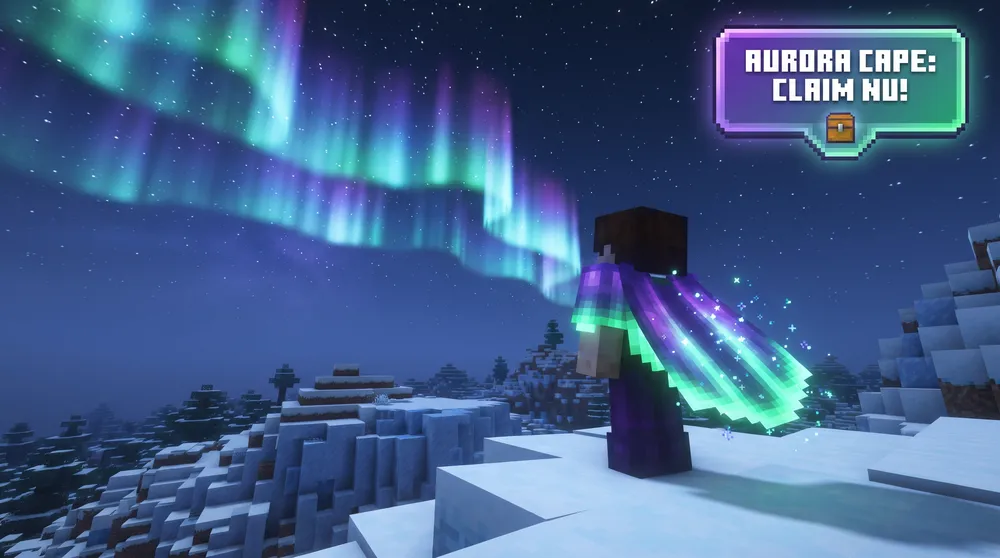
The sudden spike in search interest for the Minecraft Aurora Cape has sent players across both Java and Bedrock editions scrambling to secure redemption codes before the distribution window expires. Featuring an animated visual gradient inspired by the northern lights over frozen biomes, the Aurora Cape introduces unique aesthetic elements not seen on standard commemorative capes.
Here is the complete breakdown on how the Aurora Cape is obtained, who is eligible to claim it, and how to ensure it displays across both versions of the game.
How to Get the Aurora Cape in Minecraft
Mojang releases promotional capes through synchronized multi-platform drops, typically pairing Twitch viewer rewards, TikTok challenge codes, and official Bedrock Marketplace server events.
To claim the Aurora Cape for your Microsoft account, follow this official sequence:
-
Link Your Accounts: Open the official Minecraft portal and sign in using the primary Microsoft account tied to your game ownership. If the cape campaign runs via external partners (such as Twitch Drops or YouTube Gaming), navigate to your partner platform settings and link your Microsoft profile under Connections.
-
Complete the Watch or Task Requirement: During active promotion hours, watch participating Minecraft partner streams for the designated duration (typically 15 to 30 minutes) or complete the seasonal mini-game challenge on the official Bedrock Event Server.
-
Claim the Code in Your Inventory: Once the progress bar reaches 100 percent, click Claim in your drop inventory to receive a unique 25-character digital redemption key.
-
Redeem via Minecraft.net: Navigate to
minecraft.net/redeem. Scroll down to the Cape Redemption module, paste your code, and confirm. The item binds directly to your global Microsoft license.
Equipping the Aurora Cape on Bedrock and Java Editions
Minecraft utilizes unified license tracking, meaning unlocking the cape on one edition automatically grants access on the other, provided both use the same Microsoft login.
On Bedrock Edition:
-
Launch Minecraft Bedrock Edition from the launcher or console dashboard.
-
Select the Dressing Room button beneath your active player character.
-
Click on the Capes tab on the left-side navigation bar.
-
Locate the Aurora Cape in your unlocked inventory grid, select it, and click Equip.
On Java Edition:
-
Open the Minecraft Launcher.
-
Select the Minecraft: Java Edition tab on the left.
-
Click the Skins tab at the top of the window.
-
Hover over your active player skin, click the three horizontal dots, and select Edit.
-
Scroll down to the Capes selector, click the Aurora Cape thumbnail, and save changes.
-
Launch the game. In your in-game Video Settings, verify that Skin Customization > Cape is toggled to ON.
Troubleshooting Missing Cape Issues
Because millions of players redeem codes simultaneously during drop events, redemption delivery delays are common.
-
Launcher Cache Delay: Capes do not always appear immediately in the Java launcher. Log out of your Microsoft account in the Minecraft Launcher, close all launcher processes in Task Manager, and log back in to force an API license refresh.
-
Bedrock Server Sync: If the cape appears locked inside Bedrock's Dressing Room, load into any standard offline single-player world for 60 seconds. Exiting back to the main menu forces the local client to reconcile with Xbox Live servers.
-
OptiFine and Custom Shaders: If other players cannot see your cape in Java Edition, check your third-party client settings. Some versions of OptiFine override official Mojang capes with custom OptiFine cape textures unless toggled off under Skin Customization.
Future Availability and Rarity
Mojang strictly enforces a non-reissuance policy for special event capes. Commemorative items such as the Minecon capes, the 15th Anniversary Cape, and partner drops never return to the marketplace once their distribution window concludes.
If you miss the redemption deadline for the Aurora Cape, accounts cannot purchase it retroactively. Avoid third-party skin sites or grey-market account sellers claiming to sell standalone cape files, as capes are cryptographically verified by Mojang authentication servers and cannot be injected via client-side texture packs.