
Counter-Strike 2 Follow Recoil Setting Explained

Upon verifying the announcement of Counter-Strike 2, Valve unveiled its Beta on March 22nd, igniting a frenzy among fans. Eager players had been anxiously anticipating this sequel after enduring months of rumors and coverage from individuals like Richard Lewis.
The game experienced a considerable amount of fan fixation on every move made by Valve and Steam. With its official release, the beta is now being enjoyed by thousands of players, who are examining the numerous recent updates.
Among these updates are the completely revamped smoke physics, enhanced tickless servers, and overall refinements to the user interface. Nonetheless, there was one particular change that may have gone unnoticed by most players upon the beta's launch: an addition to the Crosshair settings menu.
Within this menu, a new option for Follow Recoil in Counter-Strike 2 has been introduced. In this article, we will delve into the specifics of this novel feature, explaining its functionality and how to best utilize it. Let's dive in!
What Is Follow Recoil In Counter-Strike 2?
In essence, the new Follow Recoil setting is straightforward and easy to comprehend. Its primary function is to make a player's crosshair track the bullet's impact point when firing their weapon.
Before we proceed, let's briefly discuss the role of recoil in FPS games. In an FPS, recoil occurs when you continuously fire, causing bullets to travel upward along a specific trajectory, deviating from the initial aim point.
This mechanic aims to emulate the behavior of real-world firearms, as the gun's blowback can cause one's aim to shift away from the intended target. Many FPS games, such as Valorant or CS, incorporate this feature.
Compared to other games, CS is particularly unforgiving due to its more severe recoil. In Counter-Strike, mastering recoil control or spray control is an essential skill, especially for players striving to excel in the game.
During professional play, one might observe players subtly moving their crosshairs downward and slightly side-to-side to compensate for recoil. CS's recoil follows patterns that players can counteract.
Additionally, in Counter-Strike 2, a player's crosshair can now trace the precise location of their weapon's recoil, resulting in more accurate spray control than ever before.
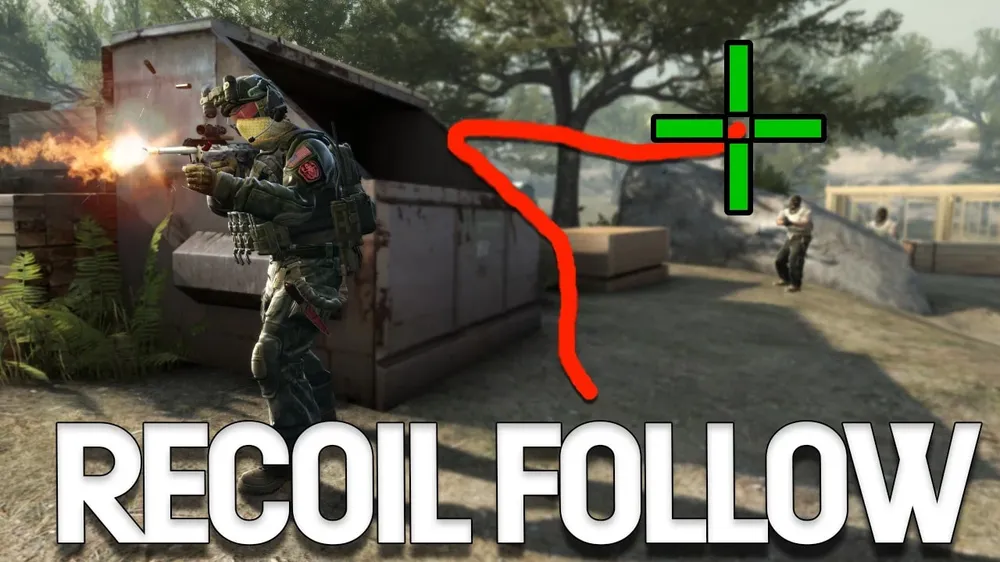
Improving your aim with Follow Recoil
After activating the Follow Recoil setting, it might initially feel odd to see your crosshair moving erratically on the screen. Nonetheless, there's an efficient way to enhance your performance with this setting enabled.
Select a target in front of you and attempt to shoot it. You'll notice that only the first two bullets hit their mark. Your objective is to adjust for recoil to ensure all your bullets hit the target accurately.
Players can achieve this by pulling their mouse downward, bearing in mind that various weapons exhibit distinct patterns. For a more comprehensive analysis, check out WarOwl's YouTube video on the topic.
The Follow Recoil option serves as an excellent visual tool to help players perfect their spray control. With this feature, the primary goal while spraying is to maintain the crosshair on target.
This system bears a resemblance to the popular Recoil Master workshop map, which assists players in practicing their spray patterns by having them trace a point that counteracts the recoil.
Furthermore, the Follow Recoil option provides players with an inverted version of this concept, requiring them to keep their crosshairs centered.
The primary aim of this feature is to simplify spraying in Counter-Strike for players by offering an in-game guide that indicates bullet impact points and necessary compensation.
If you have access to the Counter-Strike 2 beta, you can easily refine your aim with this setting. Simply enable it in the crosshair settings menu and start practicing your spray control. Remember to keep your crosshair on the target at all times.


