
Roblox Codes & Redemption Hub Guide
Consistently occupying the top search ranks, roblox redeem queries spike whenever new seasonal promotions, brand collaborations, or physical merchandise drops hit stores. Because the platform features different types of codes, players frequently run into errors attempting to input gift cards into game-specific promo fields.
Below is the verified procedure to redeem codes correctly across browser, desktop, and mobile platforms.
Types of Roblox Codes
Before attempting redemption, identify the exact category of your code:
-
Official Promo Codes: Issued directly by Roblox during corporate partnerships. These grant universal avatar accessories across your entire account.
-
Toy and Merchandise Codes: Found on physical packaging for Roblox figurines, Nerf accessories, and apparel. These unlock exclusive virtual items.
-
In-Game Experience Codes: Created by independent developers inside individual games like Blox Fruits or Pet Simulator. These do not work on the main Roblox website and must be typed into the specific game's settings menu.
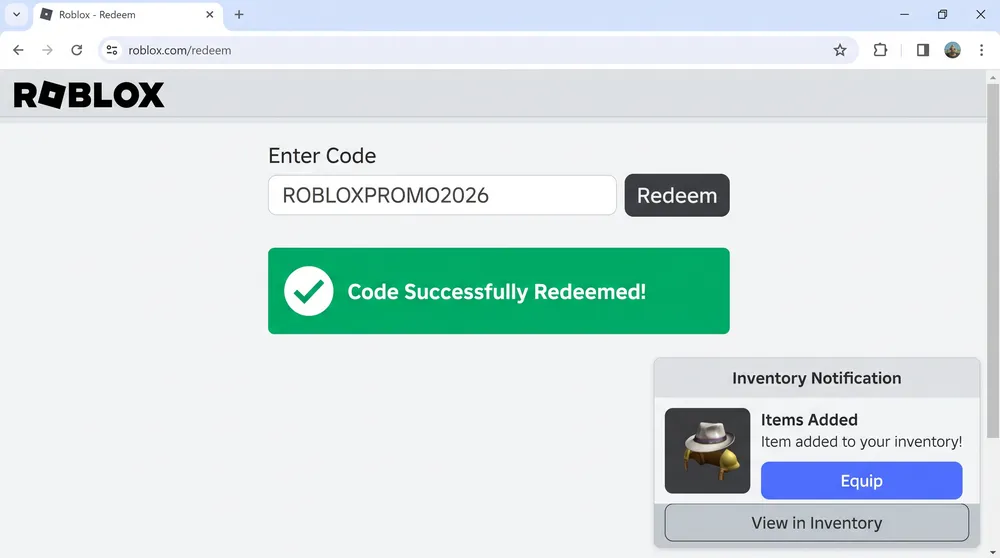
Step-by-Step: Redeeming on the Official Website
Universal promo codes and merchandise codes must be redeemed through a browser rather than the standard client interface:
-
Open your web browser and navigate directly to the verified URL:
[roblox.com/redeem](https://roblox.com/redeem). -
Log into the account where you want the item deposited.
-
Locate the white input box labeled Code.
-
Enter your 10 to 16 character code carefully, ensuring no extra spaces are pasted before or after the text.
-
Click the Redeem button.
-
A green confirmation banner will appear, displaying the exact virtual item unlocked in your account inventory.
Fixing Common Redemption Errors
If your submission fails, check these standard operational issues:
-
Error: Code Expired: Event-specific promotional codes operate on fixed time windows. Once a campaign concludes, the database locks the code permanently.
-
Error: Already Redeemed: Codes associated with physical toys are single-use. If the scratch-off strip was breached before purchase, contact customer service with receipt proof.
-
Phishing Warning: Never enter login credentials or codes into third-party generators or unverified URLs. The only legitimate portal operated by Roblox Corporation is on the official
roblox.comdomain.


